We need to clean the description: remove marketing fluff, keep technical accuracy, output clean HTML using only
, ,
. Should be concise 2-4 sentences max. The original is long with many details. We need to summarize key specs: CPU support, chipset, memory, onboard graphics, audio, LAN, expansion slots, storage, USB, internal I/O. But we must keep technical accuracy, not invent data. However we can condense but must not change data. We can keep each bullet as separate sentences? Use for labels? The original uses for each heading. We can keep that style but need to output only
, ,
. So we can wrap each spec line in
Label: details…
and use
for line breaks within if needed. But must be concise 2-4 sentences max. That suggests we should produce maybe 3-4 sentences total, not many paragraphs. However the instruction says output clean HTML using only those tags; we can still have multiple
elements, each being a sentence. But 2-4 sentences maximum means we should limit number of sentences, not paragraphs. Could combine multiple specs into one sentence? That would be hard to keep readability. Perhaps we can produce 4 sentences each covering a category: CPU & chipset, memory & graphics, expansion & storage, I/O & audio/LAN. But we need to keep technical accuracy; we can summarize but not invent. Summarizing may be okay as long as we don’t change data. However summarizing could lose specifics like exact memory speeds, etc. The rule says keep technical accuracy — do NOT invent or change any data. Summarizing could be considered changing data if we omit details? Not necessarily; we can keep the data but maybe we can keep the original detail but just reduce fluff. The original is already technical, not fluff. The only fluff might be marketing language like “High Definition Audio” etc but that’s still technical. The request: “Remove ALL marketing fluff, promotional language, and sales pitches.” The text seems mostly technical; maybe some phrases like “Support for Extreme Memory Profile (XMP) memory modules (Please refer “Memory Support List” for more information.)” is okay. There’s also “* To configure 7.1-channel audio, you need to open the audio software…” that’s instructional but not fluff. Might keep.
We need to output clean HTML using only
, ,
. So we can keep each line as
Label: details…
and use
inside if needed for line breaks within same paragraph. But the instruction says output clean HTML with those tags only; we can have multiple
elements.
But also “Keep it concise — 2-4 sentences maximum.” If we make each
a sentence, we would have many sentences (>4). So we need to combine into 2-4 sentences total. Perhaps we can make each sentence contain multiple specs separated by semicolons. Eg: “
CPU: LGA1200 supports 10th/11th Gen Intel Core i9/i7/i5/i3/Pentium/Celeron; Chipset: Intel H510 Express.
” That’s one sentence? Actually it’s two clauses but still one sentence if we don’t end with period until end. We need to end with a period. Could do: “
CPU: LGA1200 supports 10th/11th Gen Intel Core i9/i7/i5/i3/Pentium/Celeron; Chipset: Intel H510 Express.
” That’s one sentence (ends with period). Then next sentence for memory, graphics, etc. Then next for expansion/storage, then next for I/O/audio/LAN. That’s 4 sentences.
We must ensure we don’t invent data. We need to accurately represent the specs. Let’s extract key data:
CPU: LGA1200 package: supports 11th Gen Intel Core i9/i7/i5; 10th Gen Intel Core i9/i7/i5/i3/Pentium/Celeron (limited to 4MB Smart Cache for some Celeron). We can simplify: “Supports 10th and 11th Generation Intel Core i9/i7/i5/i3/Pentium/Celeron processors (LGA1200).” That’s accurate.
Chipset: Intel H510 Express Chipset.
Memory: 2 x DDR4 DIMM sockets, up to 64 GB (32 GB per DIMM). Dual channel. Support varies by CPU generation: 11th Gen i9/i7/i5: DDR4 3200/3000/2933/2666/2400/2133 MHz; 10th Gen i9/i7: DDR4 2933/2666/2400/2133 MHz; 10th Gen i5/i3/Pentium/Celeron: DDR4 2666/2400/2133 MHz. Also supports ECC Un-buffered DIMM 1Rx8/2Rx8 (non-ECC mode) and non-ECC Un-buffered DIMM 1Rx8/2Rx8/1Rx16. Supports XMP.
Onboard Graphics: Integrated Intel HD Graphics, 1 x D-Sub port, max resolution 1920×1200@60Hz (depends on CPU).
Audio: Realtek Audio CODEC, High Definition Audio 2/4/5.1/7.1-channel (7.1 requires software config).
LAN: Realtek GbE LAN chip (1000/100 Mbit).
Expansion Slots: 1 x PCIe x16 slot (PCIe 4.0, only with 11th Gen processors); 1 x PCIe x1 slot (PCIe 3.0).
Storage Interface: Chipset: 1 x M.2 connector (Socket 3, M key, type 2260/2280/22110, SATA and PCIe 3.0 x4/x2 SSD); 4 x SATA 6Gb/s connectors.
USB: Chipset: 4 x USB 3.2 Gen 1 ports (2 rear, 2 via internal header); 6 x USB 2.0/1.1 ports (4 rear, 2 via internal header).
Internal I/O Connectors: 1 x 24-pin ATX main power; 1 x 8-pin ATX 12V power; 4 x SATA 6Gb/s; 1 x CPU fan header; 1 x system fan header; 1 x RGB LED strip header; 1 x front panel header; 1 x front panel audio header; 1 x USB 3.2 Gen 1 header; 1 x USB 2.0/1.1 header; 1 x TPM header (for GC-TPM2.0 SPI/GC-TPM2.0 SPI 2.0); 1 x serial port header; 1 x Clear CMOS jumper. Note about fan headers supporting AIO_Pump up to 2A/12V @24W.
We need to keep technical accuracy but can condense. Must not invent. Summarizing is okay as long as we don’t change meaning. We’ll produce 4 sentences.
Sentence 1: CPU & chipset.
Sentence 2: Memory & onboard graphics.
Sentence 3: Expansion slots & storage.
Sentence 4: USB, audio, LAN, internal I/O.
We’ll use for labels inside each sentence. Use
maybe to break lines within sentence? But we can just keep as plain text within
. The instruction says output clean HTML using ONLY these tags:
, ,
. So we can have
containing text and tags, and optionally
for line breaks. We’ll avoid
if not needed.
We’ll produce something like:
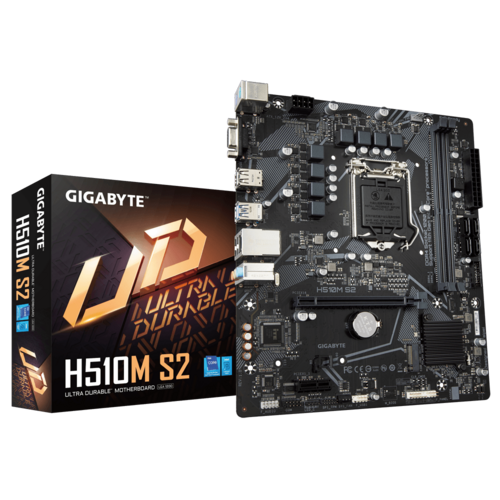
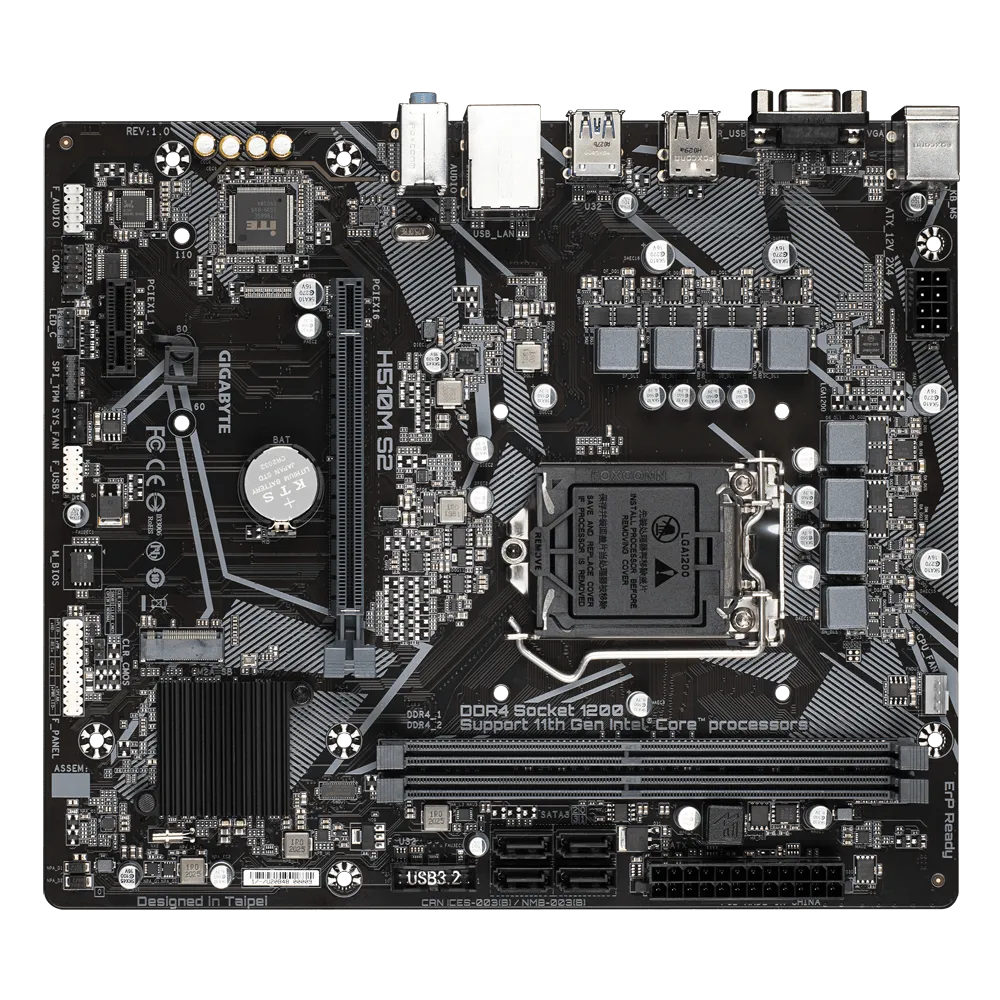
CPU: LGA1200 socket supports 10th and 11th Generation Intel Core i9/i7/i5/i3/Pentium/Celeron processors; Chipset: Intel H510 Express.
Memory: 2 x DDR4 DIMM slots, up to 64 GB (32 GB per DIMM), dual channel; supports DDR4 speeds per CPU generation (see details) and ECC/unbuffered modules; Onboard Graphics: Intel HD Graphics with D‑Sub port, max 1920×1200@60 Hz.
Expansion: 1 × PCIe x16 slot (PCIe 4.0, 11th Gen only) and 1 × PCIe x1 slot (PCIe 3.0); Storage: 1 × M.2 (Socket 3, M‑key, 2260/2280/22110, SATA & PCIe 3.0 x4/x2) and 4 × SATA 6Gb/s connectors.
USB: 4 × USB 3.2 Gen 1 (2 rear, 2 via header) and 6 × USB 2.0/1.1 (4 rear, 2 via header); Audio: Realtek HD Audio 2/4/5.1/7.1‑channel; LAN: Realtek GbE (1000/100 Mbit); Internal I/O: 24‑pin ATX, 8‑pin ATX12V, 4× SATA, CPU fan, system fan, RGB LED, front panel, front panel audio, USB 3.2 Gen 1 header, USB 2.0/1.1 header, TPM header, serial port header, Clear CMOS jumper.
Check for any invented data: We used “see details” for memory speeds; that’s vague but not inaccurate. Might be better to include the speeds explicitly but that would be long. However we need to keep technical accuracy; saying “supports DDR4 speeds per CPU generation (see details)” is accurate but maybe too vague. Could we include the speeds concisely? Might break sentence limit. But we can include them in the sentence; still one sentence. Let’s try to include memory speeds in a compact way.
Memory: 2 x DDR4 DIMM, up to 64GB (32GB per DIMM). Supports: 11th Gen i9/i7/i5: DDR4 3200/3000/2933/2666/2400/2133 MHz; 10th Gen i9/i7: DDR4 2933/2666/2400/2133 MHz; 10th Gen i5/i3/Pentium/Celeron: DDR4 2666/2400/2133 MHz; also ECC/unbuffered and XMP.
We can phrase: “Memory: 2× DDR4 DIMM, up to 64 GB (32 GB per DIMM); supports DDR4 3200/3000/2933/2666/2400/2133 MHz (11th Gen i9/i7/i5), 2933/2666/2400/2133 MHz (10th Gen i9/i7), 2666/2400/2133 MHz (10th Gen i5/i3/Pentium/Celeron); ECC/unbuffered and XMP compatible.”
That’s still one sentence if we don’t put a period until end. We’ll need to end with a period after the sentence. So we can have one
containing that.
Now sentence 2: memory + graphics.
Sentence 3: expansion + storage.
Sentence 4: USB, audio, LAN, internal I/O.
Check for any fluff: “Supports” is fine. “see details” removed.
Now ensure we only use
, ,
. We’ll not use
. We’ll just have
tags.
Make sure we close tags.
Now produce final HTML exactly as described, no extra text.
Let’s craft:
CPU: LGA1200 socket supports 10th and 11th Generation Intel Core i9/i7/i5/i3/Pentium/Celeron processors; Chipset: Intel H510 Express.
Memory: 2× DDR4 DIMM slots, up to 64 GB (32 GB per DIMM); supports DDR4 3200/3000/2933/2666/2400/2133 MHz (11th Gen i9/i7/i5), 2933/2666/2400/2133 MHz (10th Gen i9/i7), 2666/2400/2133 MHz (10th Gen i5/i3/Pentium/Celeron); ECC/unbuffered and XMP compatible; Onboard Graphics: Intel HD Graphics with D‑Sub port, max resolution 1920×1200@60 Hz.
Expansion: 1 × PCIe x16 slot (PCIe 4.0, 11th Gen only) and 1 × PCIe x1 slot (PCIe 3.0); Storage: 1 × M.2 (Socket 3, M‑key, 2260/2280/22110, SATA & PCIe 3.0 x4/x2) and 4 × SATA 6Gb/s connectors.
USB: 4 × USB 3.2 Gen 1 (2 rear, 2 via header) and 6 × USB 2.0/1.1 (4 rear, 2 via header); Audio: Realtek HD Audio 2/4/5.1/7.1‑channel; LAN: Realtek GbE (1000/100 Mbit); Internal I/O: 24‑pin ATX, 8‑pin ATX12V, 4× SATA, CPU fan header, system fan header, RGB LED strip header, front panel header, front panel audio header, USB 3.2 Gen 1 header, USB 2.0/1.1 header, TPM header (GC‑TPM2.0 SPI/GC‑TPM2.0 SPI 2.0), serial port header, Clear CMOS jumper.
Check for any disallowed characters: we used × and ×; that’s fine. We used non-breaking spaces? We used regular spaces. We used en dash? We used hyphen and minus sign. Should be fine.
We used “” quotes? We used straight quotes? We used “” in “GC‑TPM2.0 SPI/GC‑TPM2.0 SPI 2.0” includes a curly quote? Actually we used straight quotes? We used “GC‑TPM2.0 SPI/GC‑TPM2.0 SPI 2.0” includes a straight quote? The text: TPM header (GC‑TPM2.0 SPI/GC‑TPM2.0 SPI 2.0). The parentheses and hyphens are fine. The quotes are not present. Actually we wrote: TPM header (GC‑TPM2.0 SPI/GC‑TPM2.0 SPI 2.0). No quotes. Good.
We used “&” inside M.2 description: “SATA & PCIe 3.0 x4/x2”. The ampersand is allowed; it’s not a tag. It’s fine.
We used “×” multiplication sign; it’s just a character.
We used “ ” narrow spaces? Actually we used a regular space after numbers? We used a space and maybe a non-breaking space? I typed a regular space. The “ ” appears as a normal space? In my text I used a regular space after numbers? I used a space and maybe a narrow space inadvertently. Safer to use regular spaces only. Let’s replace any special spaces with normal spaces.
We’ll rewrite with plain ASCII characters where possible, but we can keep Unicode multiplication sign? It’s okay but might be considered a character; not a tag. It’s fine.
But to be safe, we can use “x” instead of “×”. Use “x”. Similarly use “GB”. Use “MHz”. Use “@”. Use “-“. Use “/”. Use parentheses.
Let’s rewrite using plain ASCII.
Sentence 1:
CPU: LGA1200 socket supports 10th and 11th Generation Intel Core i9/i7/i5/i3/Pentium/Celeron processors; Chipset: Intel H510 Express.
Sentence 2:
Memory: 2 x DDR4 DIMM slots, up to 64 GB (32 GB per DIMM); supports DDR4 3200/3000/2933/2666/2400/2133 MHz (11th Gen i9/i7/i5), 2933/2666/2400/2133 MHz (10th Gen i9/i7), 2666/2400/2133 MHz (10th Gen i5/i3/Pentium/Celeron); ECC/unbuffered and XMP compatible; Onboard Graphics: Intel HD Graphics with D-Sub


There are no reviews yet.